No ads · Free for 3/day · No signup · No fake buttons.
What bitrate does YouTube actually stream at?
This is the question almost no converter answers honestly, so here it is plainly: YouTube streams most videos at 128 kbps AAC or 160 kbps Opus — not 320 kbps. Any converter that claims "320 kbps from YouTube" is either re-encoding (which degrades quality, never improves it) or pulling the highest-bitrate source stream and simply relabeling the file 320. TubePull pulls the highest available source quality and tells you what it actually is. If the source is 128 kbps, you get 128 kbps — not a re-encoded fake 320. This is a feature, not a limitation: re-encoding a 128 kbps stream into a 320 kbps file triples the file size while throwing away nothing you can hear, and in fact introduces a second round of lossy compression. You end up with a bigger file that sounds slightly worse than the source. We refuse to ship that and call it an upgrade.
Why does YouTube cap audio there? Because for video playback, 128–160 kbps AAC/Opus is transparent to almost everyone on almost any speaker or earbud — and serving lower bitrates saves Google enormous bandwidth across billions of streams. The 320 kbps "ceiling" you see advertised across the converter space is a marketing number borrowed from the MP3 format's own maximum, not a description of what YouTube hands out. When TubePull defaults to a 320 kbps MP3 container, that simply guarantees the encoder never becomes the bottleneck: whatever quality YouTube served, the MP3 step preserves all of it. The honest framing matters because it lets you set expectations correctly and, when audio fidelity genuinely matters, choose a better source.
When 320 kbps MP3 is worth it — and when it isn't
A higher bitrate only helps up to the quality of the source. Here's how to decide what to pick:
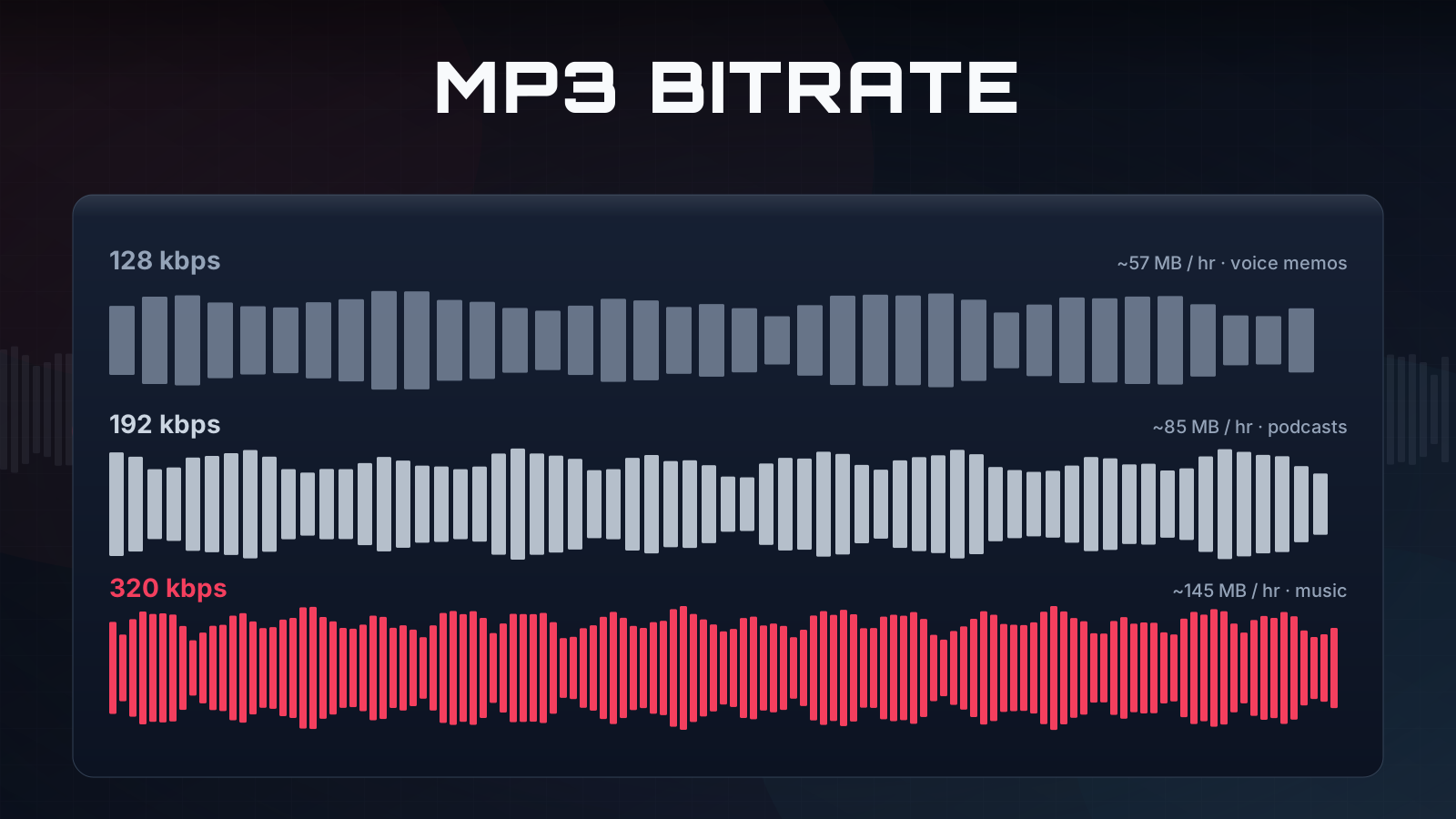
- 128 kbps — best for spoken-word podcasts, lectures, and audiobooks, where small file size matters more than fidelity and the source is voice rather than music.
- 192 kbps — a solid middle ground for casual music listening on the go, especially over Bluetooth earbuds where the wireless codec is already the limiting factor.
- 320 kbps — TubePull's default and the right choice for music you want to archive. It guarantees the MP3 encoder preserves everything the source contained, so you never lose quality at the conversion step.
The honest caveat: a 320 kbps MP3 made from a 128 kbps YouTube stream will not sound better than the YouTube stream did — it just won't sound any worse. If you want genuinely high-fidelity audio, the source has to be high-fidelity to begin with. For that, look past YouTube. Want the full breakdown of how bitrates work and where the audible thresholds actually sit? Read our guide on how bitrates work or the deep dive on downloading YouTube as 320 kbps MP3.
TubePull vs. yt2mp3, cnvmp3, y2love — an honest comparison
The top-ranked YouTube to MP3 converters — yt2mp3.gs, cnvmp3.com, y2love.com — are thin tools that work for basic use. They differ mainly on ad density: cnvmp3.com claims to be ad-free (supported by Ko-fi donations) and is a credible option; y2love.com and yt2mp3.gs run advertising of varying aggressiveness. TubePull has zero ads, supported instead by a $4.99/month paid tier that removes the daily cap on conversions. That subscription is what funds the hosted server, residential proxies, and uptime monitoring that keep conversions succeeding when YouTube changes its player — which is why a paid-supported tool tends to hold a higher success rate than an ad-funded one. The real differentiator, though, is honesty about bitrate: most tools re-encode to 320 kbps regardless of source quality; TubePull does not.
| Tool | Max bitrate | Ads | Fake buttons | Free tier | Honest about source bitrate? |
|---|---|---|---|---|---|
| TubePull | 320 kbps (no re-encode) | None | None | 3/day | Yes |
| cnvmp3.com | 320 kbps | None (donation-supported) | No | Pro | Not stated |
| yt2mp3.gs | 320 kbps | Yes | Sometimes | Pro | No |
| y2love.com | 320 kbps | Yes | Sometimes | Pro | No |
If you prefer an open-source, donation-supported tool and don't mind the absence of an honest bitrate explanation, cnvmp3.com is a reasonable pick. If you want a clean tool that tells you the truth about what you're getting and keeps a higher success rate through YouTube's frequent changes, that's the gap TubePull fills. For the wider landscape, see our full comparison of YouTube downloaders.
MP3 from SoundCloud, Bandcamp, and Mixcloud too
The same converter handles audio from SoundCloud, Bandcamp, Mixcloud and seven other platforms — one tool for everything. This matters for the bitrate question above: when fidelity counts, these sources often beat YouTube. SoundCloud Go+ tracks and many Bandcamp releases are served at higher source quality than a typical YouTube upload, so a 320 kbps MP3 from them actually carries more detail. A few use cases where that breadth pays off:
- Podcast prep. Pull a full episode as a 128 kbps MP3 for offline listening on a commute — voice doesn't need more.
- Music for offline listening. Archive tracks at 320 kbps from the highest-quality source you have access to.
- DJ prep. Grab full Mixcloud sets and SoundCloud uploads for offline cueing, where source quality and a clean, ad-free pull both matter.
Use the YouTube to MP3 converter in Claude or Perplexity
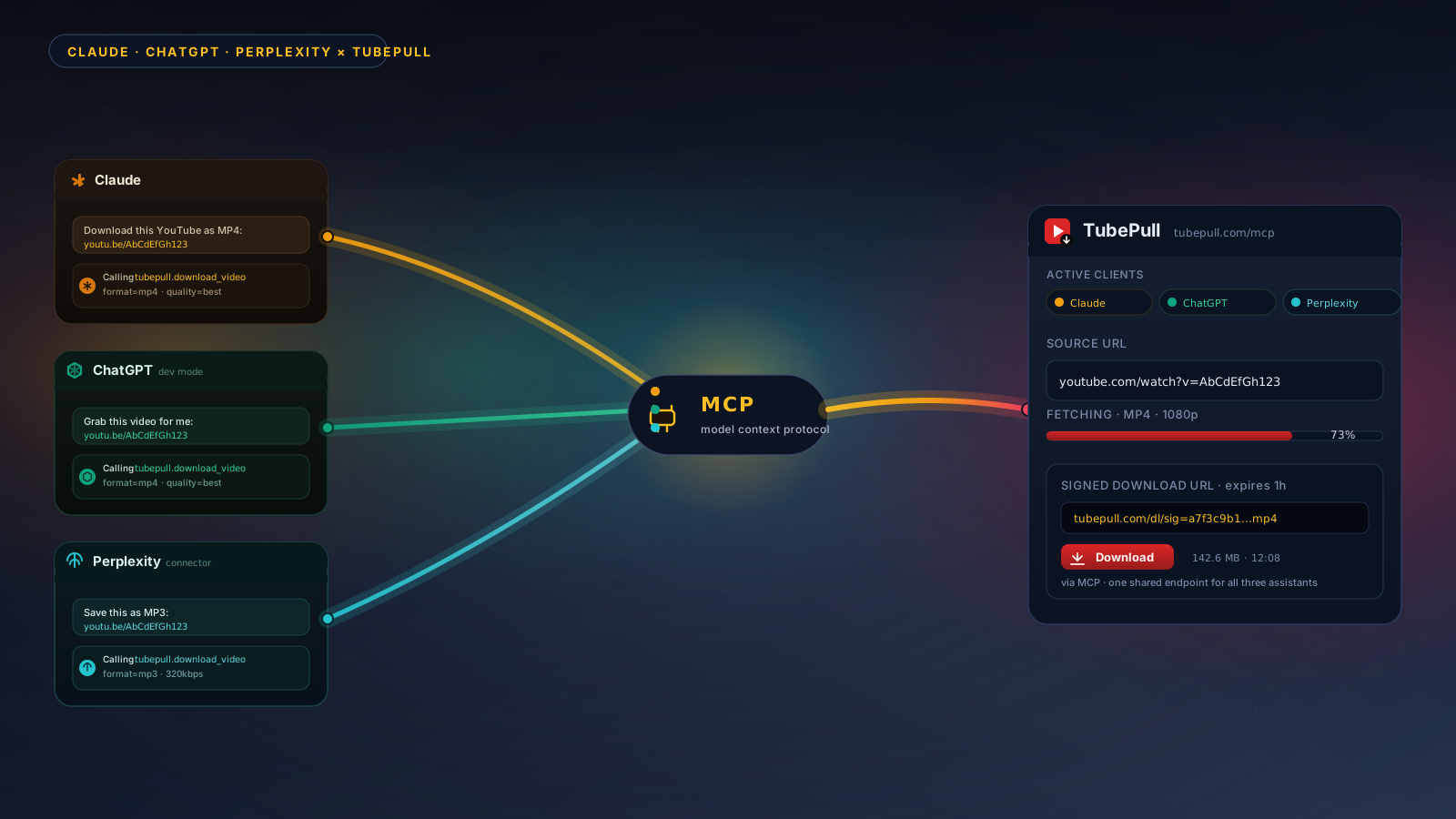
If you live inside an AI assistant, you can extract MP3 from your AI assistant without switching tabs. TubePull runs a hosted Model Context Protocol (MCP) server that lets Claude, Perplexity, ChatGPT, and Cursor convert YouTube audio directly inside a conversation — paste a link, ask for MP3, and the assistant returns a download. No install, no extension, no tab-switching. The same daily free quota and honest-bitrate behavior apply.
TubePull also handles the full YouTube video downloader experience — MP4 up to 4K — so you only need one tool regardless of format.