Paste a link.
Download any video.
Download and archive video from YouTube, TikTok, Twitch, Vimeo and 6 more — HD, 1080p, 2K & 4K MP4 or MP3, in one click. No ads, no signup.
- No signup required
- No file storage
- 3 free downloads/day
For educators saving fair-use clips, creators archiving their own uploads, researchers preserving sources, and podcasters grabbing audio before it disappears.
Only download videos you are legally allowed to download — your own uploads, public-domain works, Creative Commons material, content you have the rights holder’s permission to save, or anything that qualifies under fair use or another exception in your jurisdiction. You are responsible for confirming you have that right. See Acceptable Use.
Simple by design
How to download or archive a video or track in 3 steps
Three quick steps in any browser — the same flow for YouTube, TikTok, Twitter/X, SoundCloud, Vimeo, Dailymotion, Bandcamp, Mixcloud, Twitch, and Streamable.
No extensions, no accounts, no bloat. Works on Windows, Mac, iPhone, and Android. Use it to back up your own uploads, save Creative Commons and public-domain work, or keep fair-use clips and sources you have the right to download.
Copy the URL
Find any public video on YouTube, TikTok, Twitter/X, SoundCloud, Vimeo, Dailymotion, Bandcamp, Mixcloud, Twitch, or Streamable and copy the link from your address bar or the Share button.
Paste & pick format
Paste the URL above and select your quality — up to 1080p Full HD on the free plan (2K and 4K on Pro), or audio-only MP3.
Download instantly
Your file saves directly to your device. No waiting, no email, no account needed.
Popular guides
Guides for getting the most from your downloads
Plain-English deep dives on the formats, quality settings, and quirks people ask about most.
How to download YouTube videos in 4K (with audio)
Why 4K downloads arrive silent from most tools, and how to get a single ready-to-play 2160p MP4 with audio already merged.
Best free YouTube to MP4 converter (no install)
What separates a clean MP4 converter from the ad-heavy ones — quality options, scam patterns to avoid, and a comparison table.
YouTube to MP3 at 320 kbps — complete guide
What 320 kbps really means, whether YouTube’s audio source supports it, how TubePull encodes it, and how to verify the file.
Formats & quality
Download MP4 or MP3 from any supported platform
TubePull supports every common video and audio format — YouTube up to 4K (2160p) Ultra HD, TikTok and Twitter/X in source quality without a watermark, and SoundCloud, Bandcamp, and Mixcloud MP3 up to 320 kbps with full ID3 tags.
| Format | Best for | Quality |
|---|---|---|
| MP4 4K (2160p) Pro | Largest screens, archival, editing | Ultra HD |
| MP4 1440p (2K) Pro | High-refresh monitors, sharper-than-1080p editing | Quad HD |
| MP4 1080p (free) · 2K/4K Pro | Most desktops, TVs, modern phones | Full HD |
| MP4 720p | Tablets, slower connections | HD |
| MP4 480p | Smaller files, mobile data | SD |
| MP4 360p | Smallest file, low bandwidth | SD |
| MP3 audio | Music, podcasts, lectures | Up to 320 kbps |
| GIF (animated, 10s) Pro | Reactions, memes, presentations, Slack/Discord | 480px, 12 fps |
The qualities offered for each video depend on what the original creator uploaded.
If a video was published at 720p, 1080p and 4K won’t appear as options.
What you get
Everything you need to
download from any platform
Download video in HD up to 4K
Grab video from any supported platform in HD — 720p and 1080p Full HD free, with real 2K (1440p) and 4K (2160p) on Pro where the source offers it. TubePull merges the full-resolution video and audio into one ready-to-play MP4 at the highest quality the source actually provides — no compression, no re-encoding. Ideal for archiving your own uploads or backing up clips you have the right to keep.
MP3 Audio Extraction
Save just the audio from any video as a clean MP3 — perfect for music, podcasts, or lectures.
GIF Export — make a clip an animated GIF
Grab up to 10 seconds of any video as a clean, watermark-free animated GIF — reactions, highlights, tutorial steps. Two-pass palette encode for proper color, no upload step, no desktop app. Add a caption or leave it plain. Counts as one of your 3 free downloads a day, unlimited on Pro.
Works on Any Device
Desktop, tablet, or phone — TubePull runs in your browser with no app or extension to install.
Private & Secure
Your files go directly to your device. We don’t store, log, or retain anything you download.
Download History — remember every link
When you’re signed in, TubePull saves the original URL of everything you grab — across every supported platform — so you can find it again later. Re-pull a fresh copy in one click or open the source. Files themselves stay on your device — we never store the downloaded file. It doubles as a running archive of the sources you’ve backed up.
Free Account & ProSaved links
4K & 2K Ultra HD — on Pro
Every free download tops out at 1080p Full HD — sharp on phones, laptops, and most monitors. When you want the original 4K (2160p) or 2K (1440p) master stream straight from the source — no re-encode, no compression — Pro unlocks it, up to the highest resolution each platform offers. The quality picker auto-filters to what the source video actually provides, so a 720p upload won’t pretend to be 4K.
4K & 2K available on ProResolution ladder
Long Videos — Any Length
Free downloads cover videos up to 1 hour — plenty for music videos, tutorials, and most recaps. Need a full podcast episode, multi-hour livestream, or college lecture? Pro removes the cap entirely so you can grab videos of any length, with no surprise upgrade prompts mid-flow.
Pro removes the 1h capVideo Length
Batch Downloads — up to 5 at once
Add up to 5 URLs from any supported platform to the queue and download them all in parallel. No waiting for each one to finish before the next begins. A massive time-saver for content research, archiving, or building an offline playlist.
Pro plan onlyBatch Queue
Why TubePull
A video downloader that
actually respects your time
Most online video downloaders bury you in pop-ups, redirect ads, fake download buttons, and bundled extensions. TubePull is built differently — one paste, one click, every supported platform.
No install, no extension
TubePull runs entirely in your web browser. There’s no app to install, no Chrome extension to add, and nothing to keep updated. Works on any device with a browser.
No fake buttons or pop-ups
No misleading “Download” buttons that open junk tabs. No forced redirects. The big button on this page is the only download button you’ll ever click.
Real 4K, real HD, no watermark
Other tools claim 4K but ship 720p re-encoded, and most TikTok downloaders leave a burned-in watermark. TubePull pulls the highest-quality master stream each platform actually offers and muxes it untouched — pixel-for-pixel original, watermark-free on TikTok.
Privacy-first
Files stream straight through to your device and the working copy is deleted the moment your transfer ends. We don’t store your videos and we don’t sell your data.
Fast, predictable downloads
Direct fetch with no waiting room and no “analyzing video” spinners. Most clips finish in under 10 seconds; long 4K videos process at line speed.
Works on iPhone, Android, Mac, PC
Because it’s browser-based, the same site downloads videos from YouTube, TikTok, Twitter/X, SoundCloud, Vimeo, Dailymotion, Bandcamp, Mixcloud, Twitch, and Streamable on iPhone, iPad, Android, Windows, macOS, Linux, and Chromebooks.
How we compare
Why TubePull instead of Y2mate, SaveFrom, or SSSTik?
Most “free” downloaders handle a single platform and pay their bills with ad networks and affiliate redirects. TubePull covers ten platforms from one tool and is funded by a subscription, not ads. Here’s the side-by-side.
| TubePull | Y2mate | SaveFrom.net | SSSTik | |
|---|---|---|---|---|
| Platforms supported | 10 — one tool | YouTube only | A few, ad-gated | TikTok only |
| Ads / pop-ups | No ads | Flagged by AV vendors | Adware reports | Limited free tier with ads |
| Malware reports | None | Blocked by AVG/Malwarebytes | OpenCandy / PUP flags | — |
| 4K downloads | Yes (Pro) | No | No | No |
| Daily limit | 3 free / Pro plan | Unlimited | Unlimited | 3 max |
| Download history | Yes (signed in) | No | No | No |
| Batch downloads | Yes (Pro) | No | No | No |
| AI chatbot (MCP) | Yes — Claude, Cursor, ChatGPT | No | No | No |
Claims about competitors reflect public reports as of 2026; vendor behavior can change.
Pricing
Simple, honest pricing
Free to try — no credit card needed. Upgrade when you need more.
Free
Everything you need for occasional downloads.
- 3 downloads per day
- MP4 up to 1080p Full HD · MP3 audio
- Download history
- Videos up to 1 hour long
- Not included: Batch downloads (up to 5)
- Not included: Priority processing speed
Pro
For creators and power users who want better quality, faster workflows, and fewer limits.
- No daily download cap
- 4K & 2K Ultra HD · all HD & MP3 formats
- Animated GIF export — up to 10s clips, 480px, two-pass palette
- Download history
- Videos of any length — no 1-hour cap
- Batch queue — up to 5 videos at once
- AI assistant integration (MCP) — Claude, Cursor, ChatGPT
- Priority processing speed
- Pay with Stripe
- Check your email
- Set your password
- Start downloading instantly
Cancel anytime · no contracts
Developers
Download videos and fetch metadata programmatically.
- REST API
- Free Sandbox to start
- Usage-based plans that scale
- Overage to keep you running
Cancel anytime. No contracts. Billed monthly or annually.
Supported platforms
One downloader, ten platforms
Paste any supported URL into the same box — TubePull picks the right extractor automatically. Each platform has a dedicated page with format details, examples, and a paste box pre-tuned for that source.
YouTube Downloader (MP4 & MP3)
Download YouTube videos as MP4 up to 4K (2160p) or extract MP3 audio up to 320 kbps. Supports youtube.com/watch, youtu.be, Shorts, and live replays.
TikTok Downloader (No Watermark)
Save TikTok videos to MP4 with no watermark — the clean source file from TikTok’s CDN. Works with full links and short vm.tiktok.com / vt.tiktok.com URLs.
SoundCloud Downloader (320 kbps MP3)
Download SoundCloud tracks as MP3 with full ID3 tags (title, artist, artwork). Up to 320 kbps from Pro and Pro Unlimited uploads; 128 kbps from free-tier uploads.
OpenVimeo Downloader (up to 4K)
Download Vimeo videos as MP4 in the highest source quality the creator uploaded — typically 1080p, often 2K, and 4K (2160p) on creator-uploaded reels. Works with vimeo.com/123456789 and showcase URLs.
Dailymotion Downloader (HD, No Geoblock)
Download Dailymotion videos as MP4 in the highest variant the uploader offers — typically 720p or 1080p. Supports full dailymotion.com/video/x123abc URLs and short dai.ly share links.
Bandcamp Downloader (MP3, No Account)
Download Bandcamp tracks as MP3 (128 kbps) with full ID3 tags — title, artist, album, and artwork written in automatically. Works with any public artist.bandcamp.com/track/... URL.
Twitter / X Video Downloader
Download videos and GIFs from Twitter/X posts as MP4 — no login, no watermark, original quality. Works with twitter.com/…/status/…, x.com, and t.co short links.
Mixcloud Downloader (DJ Mixes & Shows)
Download DJ mixes and radio shows from Mixcloud as MP3 with full ID3 tags — perfect for archiving long-form sets that disappear from the platform. Works with any public mixcloud.com/<channel>/<show>/ URL.
Twitch VOD Downloader
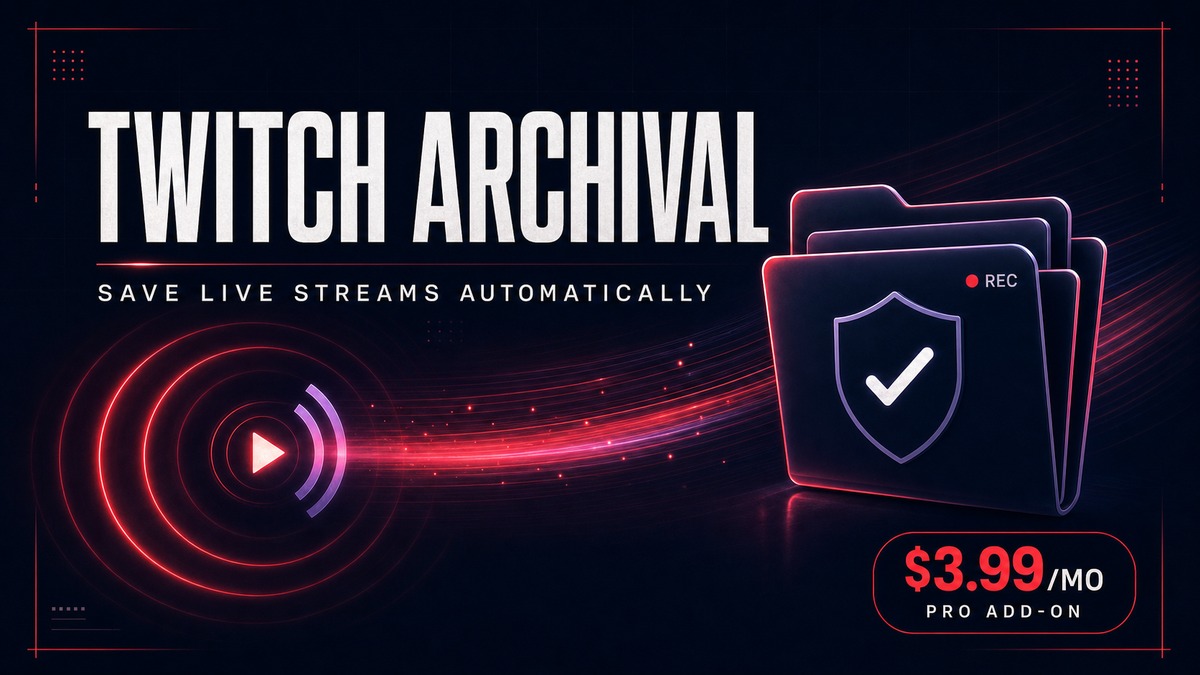
Download Twitch clips and VODs as MP4 video or MP3 audio — archive your favorite stream highlights before Twitch’s 14-day VOD auto-delete window closes. Works with clips.twitch.tv/…, twitch.tv/…/clip/…, and twitch.tv/videos/… URLs.
Streamable Downloader (No Pro)
Download Streamable videos as MP4 — no login, no premium upsell, picks the highest-quality rendition automatically. Works with any public streamable.com/<id> URL.
Works where you already are
Works inside Claude, ChatGPT, and Perplexity
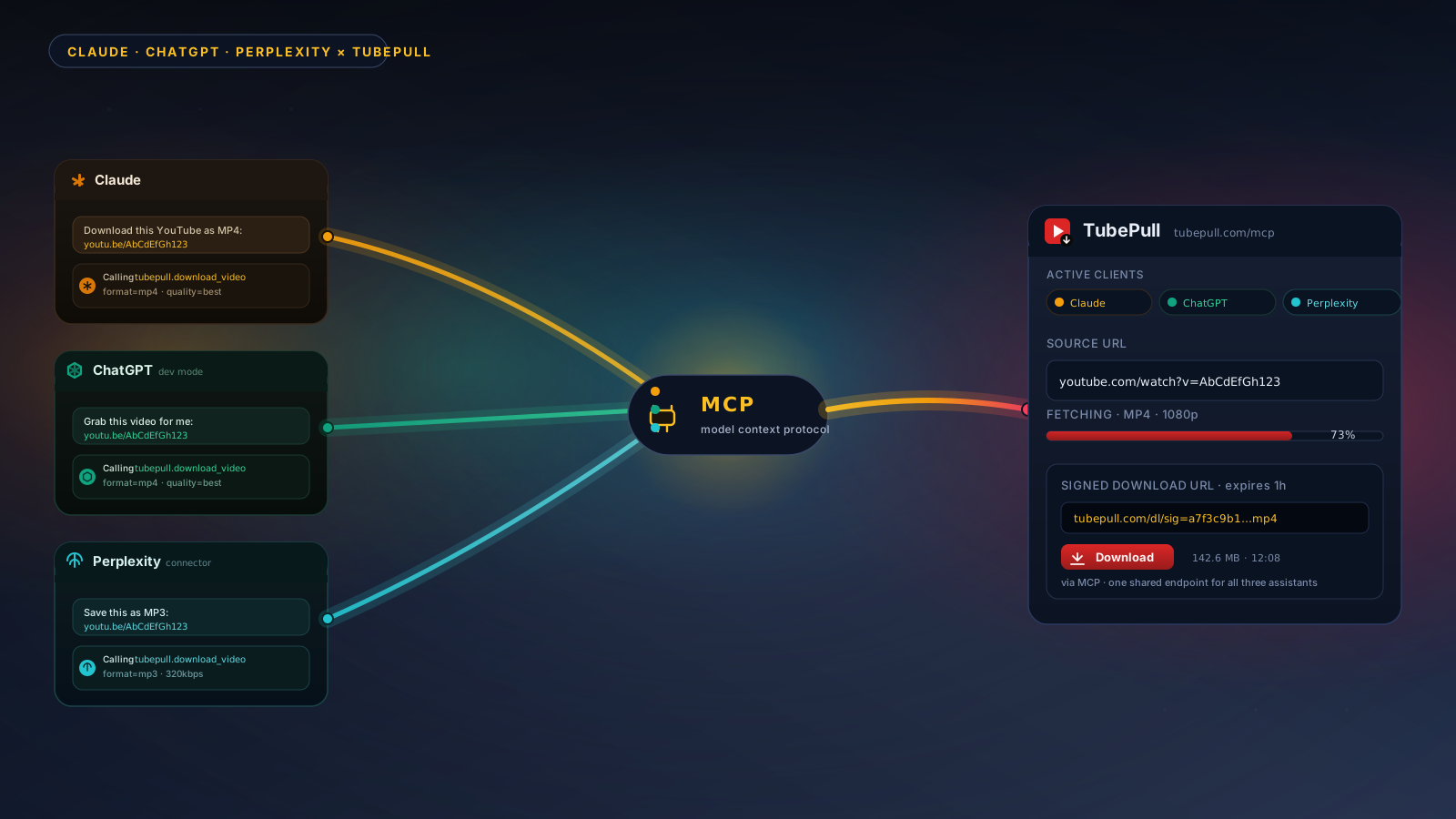
TubePull is the only multi-platform downloader with a hosted MCP server — ask your AI assistant to grab a video or track from any supported platform, just like you’d ask a person. No copy-paste, no extra tab, no setup on your end.
“Hey Claude, download youtube.com/watch?v=… in 1080p and save the MP4.”
“Pull the audio from this SoundCloud link as a 320 kbps MP3 for me.”
“Grab this Vimeo video in the highest quality and give me the download.”
FAQ
Frequently asked questions
It depends on who you are and what you do with the content. Most platforms’ Terms of Service restrict downloading unless you use a built-in download feature. However, several widely recognized lawful cases exist across every platform:
- Your own content — If you’re the creator, you can download and archive your own uploads at any time.
- Explicit creator permission — If the copyright holder grants you permission, your use is legally sound.
- Creative Commons & public domain — Videos and tracks licensed under Creative Commons or in the public domain may be freely downloaded per their license terms.
- Fair use / fair dealing — In the US and similar jurisdictions, limited use for education, commentary, research, or news may qualify. Consult a legal professional if unsure.
Downloading copyrighted content you don’t own — and especially redistributing or monetizing it — is a violation of copyright law and the platform’s Terms. TubePull is a tool for lawful downloading, archiving, and backup; you are responsible for ensuring your use complies with applicable laws.
We do not store, cache, or retain any video files on our servers. Downloads stream through our servers to your device and the working file is deleted as soon as the transfer finishes. We do, however, keep a record of each download request — URL, video title, format, your IP, and a timestamp — for rate-limiting, abuse prevention, and (for signed-in users) your download history. See our Privacy Policy for retention details.
Free users can complete up to 3 successful video downloads in any 24-hour rolling window, one video at a time. Your counter resets 24 hours after your first download of the day. Upgrading to the Pro plan removes this cap for normal use and also adds the batch downloader — queue up to 5 videos simultaneously.
Free users can download videos up to 1 hour long. Long-form content — full streams, multi-hour podcasts, lectures, and conference recordings — is a Pro-plan feature with no length cap. The preview will tell you up front if a video needs Pro so you don’t waste a click.
TubePull supports MP4 at 360p, 480p, 720p, and 1080p Full HD on the free plan, plus 1440p (2K) and 2160p (4K) on the Pro plan — alongside WebM and audio-only MP3 extraction. Quality options shown will reflect what the source video actually offers; if a video was uploaded at 720p, 1080p and 4K won’t appear as options.
Free downloads are capped at 1080p to keep the service free and fast for everyone. Upgrade to Pro to unlock 2K, 4K, and the original source quality.
No account is ever needed for free downloads — just paste a URL, no email required. We do still keep a server-side record of each request (URL, IP, timestamp) for abuse prevention and rate-limiting, but anonymous downloads never appear in a user-facing history. Pro plan subscribers create an account for download history, batch downloads, and billing management.
Pro plan users can paste up to 5 URLs from any supported platform into the batch queue at once. All five begin downloading in parallel — you don’t wait for one to finish before the next starts. Each file saves to your device as it completes. There is no limit on how many batches you can run per day.
Yes. TubePull is a web-based downloader that runs entirely in your browser, so the same workflow works on iPhone, iPad, Android, Windows, macOS, Linux, and Chromebooks — for every supported platform. There’s no app to install, no extension to add, and no operating-system-specific limitation. On iOS, downloaded files save to the Files app; on Android they go to your Downloads folder.
Yes. Switch the Format dropdown above to Audio only (MP3) and TubePull extracts a clean MP3 from any supported video at the highest available bitrate — up to 320 kbps. Perfect for music, podcasts, audiobooks, lectures, or any time you only need the audio. Output is a single MP3 file named after the original title.
Three reasons. First, TubePull works across ten platforms from one tool, so you don’t need a separate single-platform downloader for each site. Second, it doesn’t use deceptive ads, fake download buttons, forced redirects, or bundled extensions — the visible Download button is the only download button, and the output is the original master stream the source serves (1080p on the free plan, up to 4K on Pro where available), not a downscaled re-encode. Third, your files are streamed directly to your device and the working copy is deleted as soon as the transfer finishes — we don’t store, log, or sell your downloaded files.
TubePull currently downloads from YouTube, TikTok, SoundCloud, Vimeo, Dailymotion, Bandcamp, Twitter/X, Mixcloud, Twitch, and Streamable. We’re built on yt-dlp, the open-source extractor used by archival projects worldwide, so new platforms can be added quickly when there’s demand. Each platform has a dedicated page with deeper details — see the YouTube downloader (1440p/4K/MP3 320), TikTok no-watermark downloader, SoundCloud MP3 downloader, Vimeo 4K downloader, Dailymotion HD downloader, Bandcamp MP3 downloader, Twitter/X video downloader, Mixcloud DJ mix downloader, Twitch clip downloader, and Streamable video downloader.
Yes. TubePull fetches the source MP4 from TikTok’s CDN — the clean version TikTok uses internally for its For You feed — so the file you download has no spinning username overlay and no burned-in watermark. Works on full tiktok.com/@user/video/… links and short vm.tiktok.com and vt.tiktok.com share links from the mobile app.
Yes. TubePull pulls the highest-quality stream SoundCloud serves for each track and writes it to a standard MP3 file with ID3 tags (title, artist, album art) so it imports cleanly into Apple Music, iTunes, or any player that reads ID3. Tracks uploaded by SoundCloud Pro and Pro Unlimited accounts download at up to 320 kbps; free-tier uploads are typically 128 kbps.
Yes. One free or Pro account works across every supported platform. You don’t need a separate tool for TikTok and YouTube — paste any supported URL into the same box and TubePull picks the right extractor automatically. Your Pro subscription covers downloads from all platforms.
Most YouTube-specific downloaders (y2mate, savefrom, ssyoutube) only handle YouTube and tend to break for hours or days when YouTube changes its CDN or player. TubePull supports YouTube, TikTok, SoundCloud, Vimeo, Dailymotion, Bandcamp, Twitter/X, Mixcloud, Twitch, and Streamable from one tool, and we’re built on yt-dlp — the open-source extractor that ships fixes within hours of upstream changes.
From the blog
Guides and deep dives
Long-form coverage of downloading and archiving across platforms — formats, quality, legality, and yt-dlp tricks. Updated as the platforms change.
Dailymotion to MP3: Convert Dailymotion Videos to Audio (2026 Guide)
How to convert any Dailymotion video to MP3 audio — the step-by-step flow, what bitrate you get, MP3 quality options, and the legal side of ripping audio for personal use.
How to Download Dailymotion Videos as MP4 (2026 Guide)
A step-by-step guide to downloading any Dailymotion video as an MP4 — how the quality ladder works, what resolutions you can save, and how Dailymotion differs from YouTube for downloading.
SoundCloud 320 kbps vs 128 kbps: Which Quality Should You Download?
SoundCloud 320 kbps vs 128 kbps explained — what each bitrate means, what SoundCloud actually streams, whether you can hear the difference, and which to download.
Twitch Clips vs VODs: What Expires, What Doesn't, and How to Save Both
Twitch clips and Twitch VODs are not the same thing — and only one of them expires. Here's what each is, how long Twitch VODs last, and how to save both before they're gone.
Heading to GCX 2026? A Content Checklist for Creators
Going to GCX 2026? Use this creator checklist to capture, organize, clip, and preserve your gaming content before and after the event.
How to Make a Meme From a YouTube Video (2026 Guide)
TubePull now turns any YouTube clip into a captioned meme GIF — top or bottom text, white or yellow, black outline, no watermark, right in the browser. Here's how the meme generator works, why it's a GIF and not a still image, and how free users get one meme a day.
How to Make a GIF From a YouTube Video (2026 Guide)
TubePull exports any 10-second clip from a YouTube video as an animated GIF — no watermark, no desktop app, right in the browser. It counts as one of your 3 free downloads a day (unlimited on Pro). Here's how the GIF exporter works, why it's capped at 10 seconds, and how to grab the exact moment you want.
Introducing the TubePull Developer API: Real Video Downloads, Predictable Pricing
TubePull now has a REST API. Queue YouTube and social-video downloads programmatically, get the finished file on a signed link, and pay a flat monthly price from $19/mo — the only managed download API at developer pricing.
Best Free YouTube Downloader in 2026 — We Tested 10 Tools
An honest, hands-on roundup of 10 free YouTube downloaders for 2026 — browser tools, desktop apps, and the command line — with a full comparison table and a clear decision guide.
The Best MCP Video Downloader in 2026 — A Practical Guide
Which MCP servers can actually download video and audio in 2026? An honest shortlist of real, published servers — local yt-dlp wrappers and the one hosted remote option — plus setup for Claude, Cursor, and Perplexity.
How to Set Up TubePull MCP in ChatGPT (Developer Mode)
Step-by-step guide: connect TubePull's hosted MCP server to ChatGPT using Developer Mode so you can ask ChatGPT to download YouTube videos as MP4 or MP3.
Is SSSTik Safe? The $9.99/Week 'Free Trial' Trap Explained (2026)
SSSTik.io advertises a free TikTok and YouTube downloader, then enrolls users in a $9.99/week subscription after 2-3 downloads. Here's what's actually happening and how to dispute charges.