

Twitch VODs expire on a tiered timer: 7 days for base broadcasters, 14 for Affiliates, and 60 for Partners, Prime, and Turbo subscribers. A separate rule caps Highlights and Uploads (not raw Past Broadcasts) at 100 combined hours of storage per channel. Once either limit is hit, the video is gone — there's no undo, no support ticket that brings it back. Everything below explains exactly how those windows work, how much storage a stream actually needs to archive, and the real tradeoff between the two ways people solve this: paying a hosted service to record to their cloud, or archiving straight into your own.
How long Twitch actually keeps a VOD
Twitch's Past Broadcast retention depends entirely on account tier, and it's the single most-asked question about Twitch archiving for a reason — the defaults are short and easy to miss until a VOD you needed is already gone. Twitch publishes the current windows in its Video on Demand help documentation.
| Account tier | Past Broadcast (VOD) retention |
|---|---|
| Base / non-monetized streamer | 7 days |
| Twitch Affiliate | 14 days |
| Twitch Partner, Turbo, or Prime subscriber | 60 days |
| Highlights (manually marked "preserve") | Indefinite, but count against the 100-hour cap below |
| Clips | Indefinite in theory — removed only if the channel is banned, deleted, or the clip is DMCA'd |
We cover the clip-vs-VOD distinction in more depth in Twitch Clips vs VODs: What Expires, What Doesn't — the short version is that clips and VODs are not the same kind of file and do not follow the same rules, which is exactly why so many people are surprised when a full broadcast disappears while an old clip from the same stream is still up.
The separate 100-hour Highlights and Uploads cap
Since April 2025, Twitch has also enforced a combined 100-hour storage cap across Highlights and Uploads per channel — a rule that's distinct from, and frequently confused with, the 7/14/60-day Past Broadcast timers above. This cap doesn't touch raw Past Broadcasts or Clips; it specifically limits the total runtime of content a streamer has manually saved as a Highlight or manually uploaded. Once a channel's Highlights and Uploads combined runtime hits 100 hours, saving more requires deleting older saved content first. It's a quieter, less-publicized rule than the Past Broadcast timer, but it matters for exactly the streamers most likely to be actively archiving their own back catalog.
How much storage does a Twitch VOD actually need?
Before comparing archiving options, it helps to know what you're actually storing. Twitch broadcasts are served at several quality tiers, and file size scales roughly linearly with stream length:
| Stream length | Source quality (1080p60) | 720p60 |
|---|---|---|
| 1 hour | ~2.5–3.5 GB | ~1.3–1.8 GB |
| 3 hours | ~7.5–10.5 GB | ~4–5.5 GB |
| 6 hours (marathon/subathon) | ~15–21 GB | ~8–11 GB |
| 12 hours | ~30–42 GB | ~16–22 GB |
These are estimates — actual size depends on bitrate, scene complexity, and whether a channel streams at 1080p60 (partnered channels) or a lower tier. The practical takeaway: a streamer going live regularly and archiving every broadcast at source quality can burn through tens of gigabytes a week, which is exactly why where that storage lives — and who's paying for it — is the real decision, not just whether archiving happens at all.
Own-cloud vs. hosted: the two ways people archive Twitch
Once you've decided to stop relying on Twitch's own retention window, there are really only two models on the market, and they behave very differently the moment you stop paying for them.
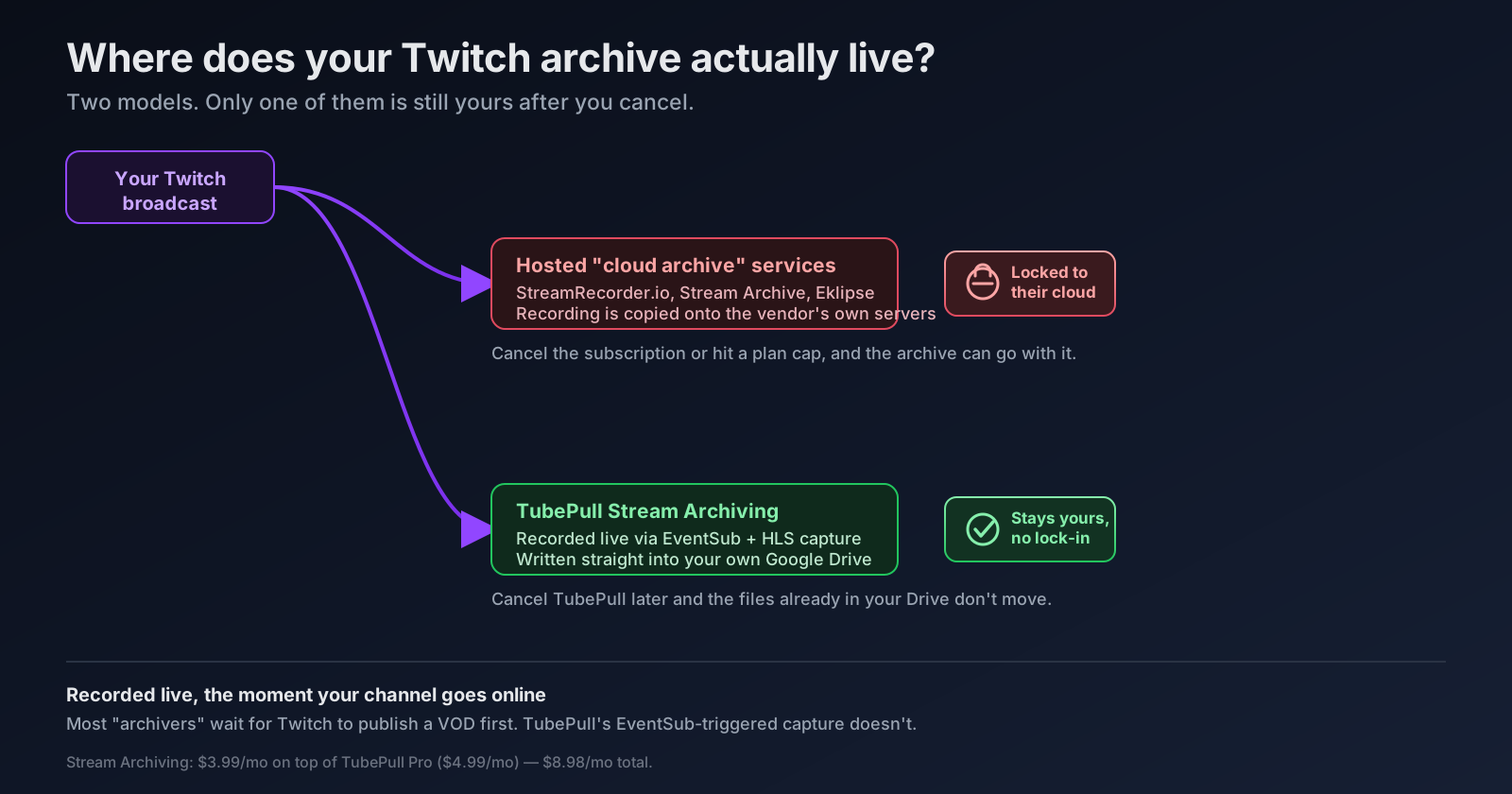
Hosted archiving services — StreamRecorder.io, Stream Archive (streamarchive.io), and Eklipse are the most visible examples — record your broadcast onto their servers. You get a dashboard, a "permanent" storage pitch, and usually a free tier with a short retention window (StreamRecorder's free tier, for example, keeps recordings for only a handful of days before a paid plan is required). The catch is structural, not a matter of one vendor being worse than another: if the archive lives on the vendor's infrastructure, canceling the subscription, downgrading a plan, or the vendor changing its terms can take your archive with it. You never actually held the file.
Own-cloud archiving flips that. VOD Manager pioneered this model for Twitch, passing recordings straight through to a destination you already control — Google Drive, Dropbox, OneDrive, or an S3-compatible bucket. TubePull's Stream Archiving add-on, part of TubePull Live, works the same way but specifically targets Google Drive: connect a Twitch channel and a Drive account once, and every future broadcast is recorded and written directly into a folder in your Drive. TubePull never keeps a separate copy on its own servers. If you cancel TubePull tomorrow, the files already sitting in your Drive don't move, don't get revoked, and don't depend on TubePull staying in business.
How the actual tools compare
| Tool | Storage destination | Capture timing | Retention if you stop paying | Manual clip/VOD download |
|---|---|---|---|---|
| TubePull Stream Archiving | Your own Google Drive | Recorded live via EventSub the moment your channel goes online | Unaffected — files already in your Drive stay put | Yes, free up to 1 hour of output; any length on Pro |
| VOD Manager | Your Drive, Dropbox, OneDrive, S3, R2, B2, or Wasabi | Fetches after the VOD (and chat) publishes | Unaffected — same own-storage model | Not its focus; storage-passthrough tool |
| StreamRecorder.io | Vendor's own servers | Fetches after the stream/VOD is available | At risk — free tier caps retention at a few days; paid retention still lives on their infrastructure | Limited, paid tiers |
| Stream Archive (streamarchive.io) | Vendor's own servers | Fetches after the broadcast | At risk — markets "permanent" storage, but it's the vendor's cloud | Download gated behind premium |
| Eklipse | Vendor's own servers ("Eklipse Cloud") | Fetches after the stream, framed as an editing workspace | At risk — 90-day editing window, not positioned as permanent storage | Clip-focused, not full VOD download |
| TwitchDownloader (open source) | Wherever you point it, locally | Manual, one VOD/clip at a time | N/A — it's a local tool, not a subscription | Yes, manual only, no automation |
The pattern holds across every hosted competitor we could find: none of them pass storage through to an account you control, which means the "permanent" language in their marketing is true only as long as your subscription is. TubePull and VOD Manager are the two tools we found that avoid that tradeoff entirely by never taking custody of the file in the first place.
Recorded live, not fetched after the fact
There's a second, independent axis worth separating from the storage question: when does capture actually start? Most tools in the comparison above — including most hosted archivers — wait for your broadcast to end and for Twitch to finish publishing a VOD before they have anything to grab. TubePull's Stream Archiving instead subscribes to your channel's stream.online event through Twitch's EventSub webhook system, so recording starts the moment you go live, not after. That closes the gap that catches a crashed broadcast, a channel where VOD storage was never turned on, or a VOD Twitch is slow to publish. We cover exactly how that pipeline works, segment by segment, in How TubePull Twitch Archiving Actually Works: Recorded Live, Not After the Fact.
Setting up own-cloud archiving on TubePull
- Be on TubePull Pro ($4.99/month) — Stream Archiving is an add-on to Pro, not a standalone plan.
- Connect your Twitch channel via a one-click OAuth flow from your account page.
- Connect Google Drive and authorize TubePull to write to a dedicated folder — TubePull never touches the rest of your Drive.
- Turn on Stream Archiving for $3.99/month more — $8.98/month total, billed as one line item on your existing Pro subscription.
From there, every future broadcast is recorded live and lands in your Drive automatically. Full setup details, including the daily download cap and 4K/MP3-320 unlocks that come with Pro, are on the Twitch downloader page. If you just need one specific VOD or clip right now rather than ongoing archiving, paste the URL into the same page — public manual downloads are free for up to one hour of output, with 3 downloads per 24 hours. Pro removes both limits.
FAQ: Twitch VOD storage and archiving
Why did my Twitch VOD disappear? Almost always the retention timer: 7 days for base broadcasters, 14 for Affiliates, 60 for Partners/Turbo/Prime. Once that window closes, Twitch deletes the file permanently — there's no recovery path, for the streamer or anyone else.
Does Twitch save your VODs for longer than two weeks now? Only if the channel is a Partner or has Turbo/Prime-subscriber status, which extends Past Broadcast retention to 60 days. Affiliates still get 14 days, and non-monetized channels get 7 — the two-week figure people remember is specifically the Affiliate tier, not a universal default.
Can I download or archive Twitch VODs automatically? Yes — TubePull's Stream Archiving add-on records a connected channel's broadcasts live and saves them to the subscriber's own Google Drive with no manual download step per stream. VOD Manager offers a similar own-cloud model across more storage providers. Manual, one-at-a-time TubePull downloads are free for up to one hour of output (3 per 24 hours); Pro removes both limits.
What's the difference between own-cloud and hosted Twitch archiving? Own-cloud archiving (TubePull, VOD Manager) writes your recording directly into storage you already control — Google Drive, Dropbox, S3, and similar. Hosted archiving (StreamRecorder.io, Stream Archive, Eklipse) copies the recording onto the vendor's own servers instead. The practical difference shows up the moment you stop paying: own-cloud archives stay exactly where they were; hosted archives are at the vendor's mercy.
How much storage do I need for Twitch VODs? Roughly 2.5–3.5 GB per hour at 1080p60 source quality, or about 1.3–1.8 GB per hour at 720p60. A 3-hour stream is typically 7.5–10.5 GB at source quality; a 12-hour marathon can run 30–42 GB.
What happens to my archived VODs if I delete my Twitch channel? If you're using own-cloud archiving, nothing — the files already in your Drive are entirely independent of your Twitch account's status. If you're relying on a hosted archiver or Twitch's own VOD storage, a deleted channel typically takes those recordings with it.
More guides
- How TubePull Twitch Archiving Actually Works: Recorded Live, Not After the Fact — the EventSub-to-Drive pipeline behind real-time capture
- Never Miss a Stream: Twitch Archival Is Now on TubePull — the Stream Archiving feature announcement and pricing
- Twitch Clips vs VODs: What Expires, What Doesn't — the retention rules, tier by tier
- Archive Twitch Clips and VODs Before the Timer Runs Out — the manual, per-URL download workflow