This is a real-time Twitch stream recorder and archiver, built around one deadline: Twitch deletes most VODs 7 days after the stream ends (14 days for Partners, Prime, and Turbo). Most "Twitch archive" tools only fetch a VOD after Twitch finishes publishing it — TubePull's Stream Archiving add-on doesn't wait. Connect your Twitch channel once, and every future broadcast is recorded live as it streams, the moment your channel goes online, and lands in your own Google Drive automatically with zero manual steps. Because the recording happens in real time instead of after the fact, a crash, a channel where VOD storage was never turned on, or a broadcast Twitch is slow to publish don't leave you with nothing to archive. Archiving is $3.99/month on top of TubePull Pro ($4.99/month) — $8.98/month total — since the add-on rides on an active Pro subscription rather than selling standalone. No pasting links after every broadcast, no remembering which stream is about to expire, no losing a four-hour broadcast because you were asleep when the timer ran out.
Already have a specific VOD or clip you want right now, one at a time? Paste the URL into the box above — that manual path is a TubePull Pro feature ($4.99/month) for VODs (clips are free), and Pro is also the plan that unlocks Stream Archiving, so if you're on Pro anyway the add-on is just $3.99/month more. New to how Twitch's expiry windows work? Start with our guide on how to archive Twitch clips and VODs.
Auto-archive every Twitch VOD to your own Google Drive
Set it up once: be on the TubePull Pro plan ($4.99/month), connect your Twitch account, connect Google Drive, and turn on the $3.99/month Stream Archiving add-on — $8.98/month total, billed as one Stripe invoice. From that point forward, TubePull picks up your channel's stream-online event and records the broadcast in real time while you're live — up to 12 hours per broadcast — writing it into an MP4 that lands in a dedicated TubePull folder in your own Google Drive — not a third-party server you don't control. Your archive is ready shortly after you end the broadcast, with no waiting on Twitch to publish a VOD first; if a broadcast starts without us seeing it go live, we fall back to fetching the VOD once Twitch publishes it. If you already pay for Google One storage, archives ride on space you're already renting instead of a new proprietary vendor you'd have to trust with your only copy.
This is deliberately your storage, not ours. Most hosted "stream archive" services (see the comparison below) lock your recordings inside their own cloud and dangle "permanent" storage as the pitch — until you cancel or hit a plan cap, at which point your archive is gone too. TubePull never hosts a copy of your VODs; the file goes straight from Twitch's CDN to your Drive, so it's yours no matter what happens to TubePull, your subscription, or your storage plan later.
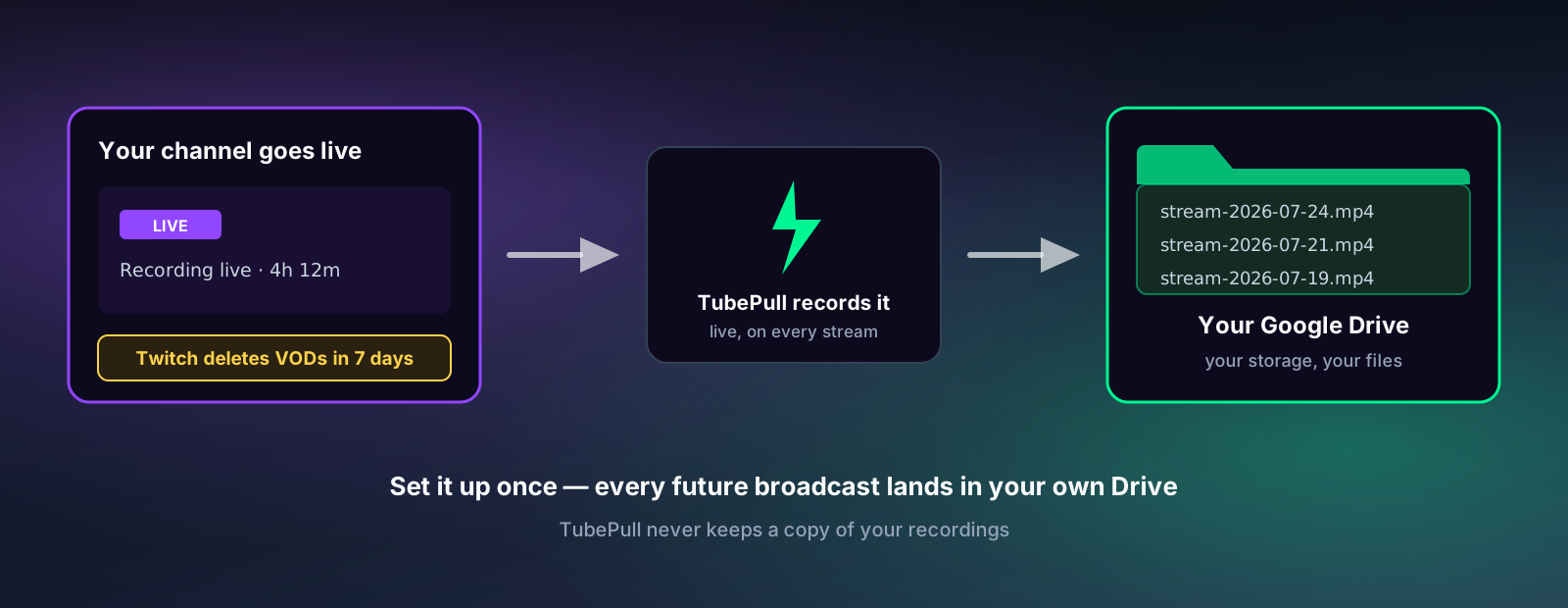
How to turn on Stream Archiving
- Be on TubePull Pro ($4.99/month) — Stream Archiving is an add-on to Pro, not a standalone plan; it isn't available on the free tier.
- Connect Twitch — link your channel with a one-click OAuth flow from your account page. TubePull can also optionally import your channel's existing published VODs as a one-time backfill, not just new ones going forward.
- Connect Google Drive — authorize TubePull to write to a dedicated folder in your Drive. TubePull never touches the rest of your Drive.
- Add Stream Archiving — $3.99/month more, billed as one line item on your existing TubePull Pro subscription (one invoice, one charge — no separate account to manage). That's $8.98/month total for Pro plus archiving.
Once all four steps show connected, archiving runs in the background with no further action from you. Go live and TubePull starts recording right away, so by the time you end the broadcast the MP4 is already on its way into your Drive.
Recorded live, not fetched after the fact — how real-time capture works
Most tools that call themselves a "Twitch archiver" are Twitch VOD downloaders on a timer: they wait for your stream to end, wait for Twitch to finish processing the recording, wait for Twitch to publish it as a VOD, and only then go fetch it. That chain has three points of failure before a single byte is saved. TubePull's Stream Archiving skips it entirely by subscribing to your channel's stream.online event through Twitch's EventSub webhook system — the instant that event fires, TubePull's worker starts pulling your broadcast's live HLS segments in real time, the same segments your viewers are watching, and joins them into an MP4 as the stream plays out. By the time you end the broadcast, most of the recording is already finished; there's no separate VOD-processing wait afterward.
That distinction matters because a fetch-after-the-fact archiver has nothing to fetch if the stream crashes mid-broadcast, if the channel never had VOD storage turned on, or if the VOD gets deleted or DMCA'd before anything gets a chance to grab it. Recording live closes all three gaps at once — the archive already exists in your own Google Drive regardless of what happens to the VOD afterward.
Real-time capture also works for streams that a local recording setup simply can't reach. Because archiving is triggered by your channel going live rather than by software running on your broadcasting device, it captures a broadcast the same way whether you streamed from a gaming PC with OBS, the Twitch mobile app at a convention, or a hardware encoder in the field — and it adds no encoding load to your own machine while you're live, so there's no frame-rate cost from a second local recording competing for the same CPU and GPU your stream encode is already using. See How Twitch Archiving Actually Works: Recorded Live, Not After the Fact for the full breakdown, including the EventSub-to-Drive pipeline and where the edges of live capture are (a 12-hour cap per broadcast, no chat capture).
Still need to grab one VOD or clip by hand? That's Pro.
Not every use case needs full-channel auto-archiving. Maybe you just want one specific VOD from before you turned archiving on. For that, paste the twitch.tv/videos/VOD_ID URL into the box at the top of this page. Manual Twitch VOD downloads are a TubePull Pro feature ($4.99/month) — the same plan that also removes the daily download cap and unlocks 4K and MP3-320 across every other platform TubePull supports. If you paste a VOD link without Pro, TubePull routes you to upgrade rather than starting a download it won't finish.
Pro and the Stream Archiving add-on solve different problems, but they aren't separate purchases — Stream Archiving is $3.99/month on top of Pro, so archiving alone still costs $8.98/month, not $3.99. Pro is ad hoc, download-it-now; Stream Archiving is set-and-forget, your-own-channel, every-broadcast-forever, and every archiving subscriber is already paying for Pro's manual downloads too, whether or not they use that half of it.
Download long Twitch VODs — multi-hour streams, no browser timeouts
Manual Pro downloads handle Twitch VODs of any length, including 6+ hour marathon streams and full esports broadcasts; automatic archive jobs capture up to 12 hours per broadcast. Downloads run server-side rather than in your browser, so there's no tab timeout to race and no memory ceiling to hit. A real-time fragment progress indicator shows exactly how many HLS segments have been pulled and joined, so a multi-hour VOD reports true status instead of a frozen bar.
Clip Range — the feature most Twitch downloaders can't do at all
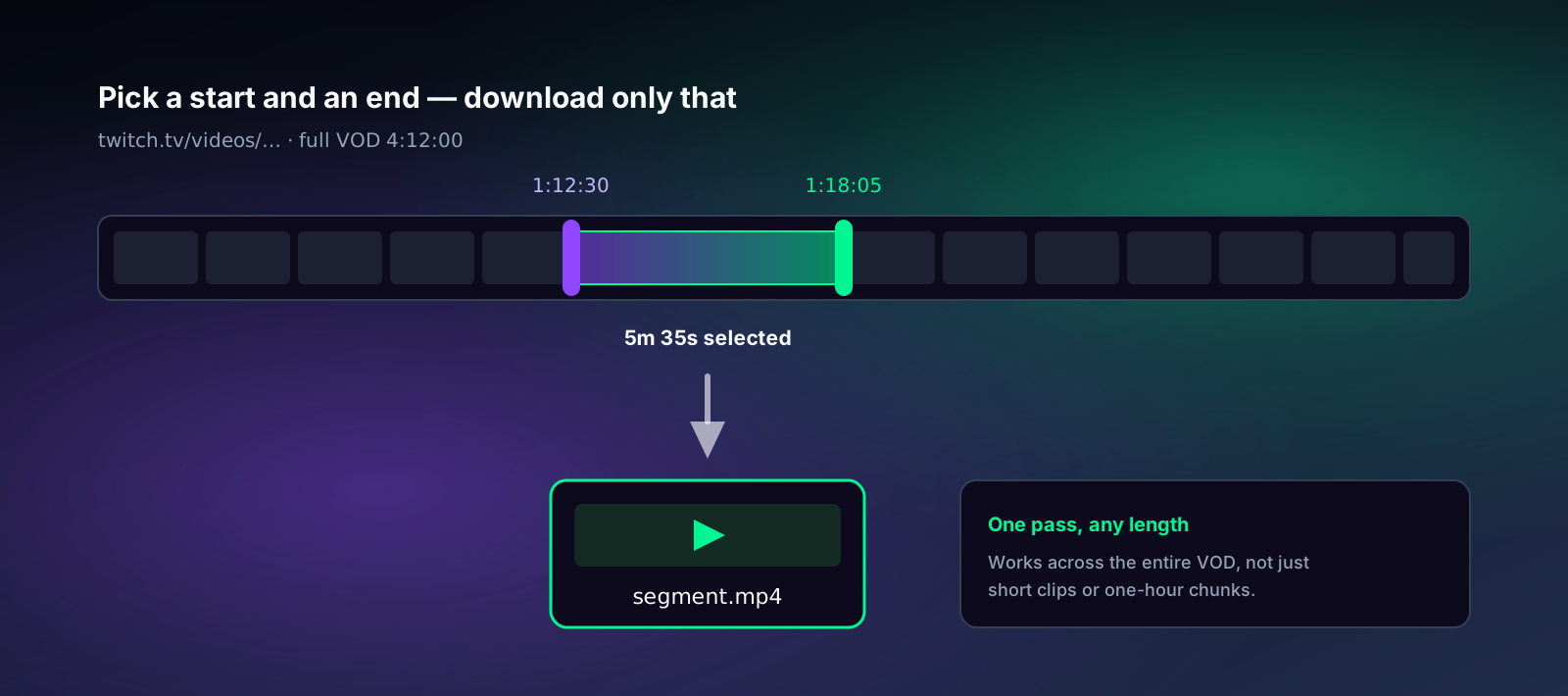
You don't always want a full four-hour VOD. TubePull's Clip Range lets you set a start and end timecode on a Twitch VOD and download just that segment as an MP4 — the clutch play, the interview, the one song from a DJ set — without pulling the whole file. The Clip Range controls are on every tier — free included for Twitch clip URLs and meme GIF exports — but a clipped VOD download needs Pro, the same as any other Twitch VOD download. It's one of the sharpest differentiators TubePull has: most competing Twitch downloaders either can't do partial VOD downloads at all, or only offer trimming on short clips, not full-length VODs. A few forums-favorite tools cap this at roughly an hour per chunk, forcing you to stitch multiple downloads back together for anything longer. TubePull's Clip Range works across the entire VOD length in one pass, from the same URL box used for full downloads.
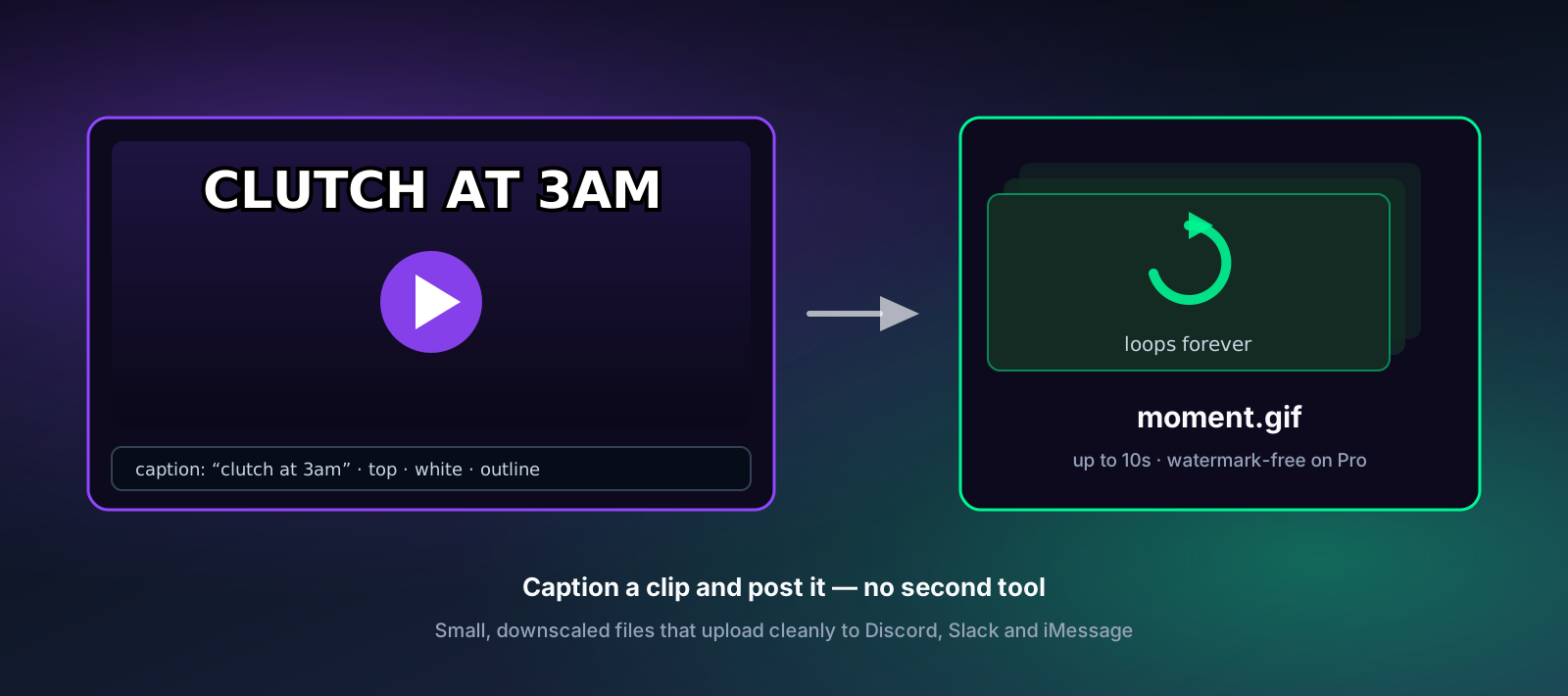
Turn any Twitch clip or VOD moment into a meme GIF
TubePull also exports captioned meme GIFs directly from a Twitch clip or VOD — pick GIF in the format selector, set your clip window, type a caption (up to 80 characters, top or bottom, white or yellow with the classic black outline), and download a ready-to-post GIF. No separate download-then-caption workflow, no second tool. GIFs are capped at 10 seconds and downscaled for fast, small files that post cleanly to Discord, Slack, iMessage, and group chats. Free and anonymous exports carry a small badge in the corner; Pro exports are watermark-free. This is another spot where TubePull goes further than typical Twitch downloaders, most of which stop at "download the clip" and leave meme-making to a separate app. See the full video-to-meme GIF maker for details on caption styling and limits.
What Stream Archiving covers vs. what Pro's manual download covers
| Stream Archiving ($8.98/mo total — Pro $4.99/mo + $3.99/mo add-on) | Pro manual download (included in the $4.99/mo Pro plan) | |
|---|---|---|
| Capture timing | Recorded live as you stream (VOD fetched afterwards only if the live capture was missed) | After the fact, from a published VOD or clip |
| Scope | Your own connected Twitch channel, every broadcast, recorded live | One VOD or clip URL at a time |
| Storage | Your own Google Drive | Your device (whatever you're downloading to) |
| Setup | Requires an active Pro subscription, then connect Twitch + Drive, toggle on | None beyond Pro — paste a URL |
| Ongoing effort | Zero — runs on every future stream | Manual, per download |
| Length | Up to 12 hours per broadcast | Any length |
| Clips | Not archived automatically (full broadcasts only) | Free on every tier, no Pro needed |
| Clip Range (partial VOD) | N/A (the full broadcast is archived) | Yes — Pro for VODs, free on clips |
| Meme/GIF export | N/A | Yes, every tier (watermark-free on Pro) |
What you can archive or download from Twitch
- VODs —
twitch.tv/videos/VOD_ID, while the VOD is still on Twitch (7 days for most channels, 14 for Partners/Prime/Turbo). Auto-archived by the add-on on your own connected channel, or pulled on demand with Pro. - Highlights — VODs a streamer manually preserved past the auto-delete window. They don't expire, and they download exactly like a normal VOD.
- Clips —
clips.twitch.tv/SLUGortwitch.tv/CHANNEL/clip/SLUG. Free on every tier, permanent in theory but they vanish the moment a channel is banned, deleted, or hit with a DMCA takedown. - Mobile share links from the Twitch app — both VOD and clip share URLs resolve correctly.
- The full broadcast quality the streamer used — up to source (1080p60 on partnered channels).
- Audio-only as MP3 — for music sets, DJ streams, and podcast-style broadcasts where you only want the sound.
- Animated meme GIFs — export up to 10 seconds with an optional caption, free with a small badge, watermark-free on Pro.
How TubePull pulls a Twitch VOD — GraphQL, HLS, and .ts segments
Twitch serves video over HLS — the broadcast is chunked into short .ts segments behind a stitched playlist at several quality tiers (160p through source/1080p60). Clips are pre-rendered MP4 files on Twitch's clip CDN, fronted by short-lived signed URLs. Whether triggered by an EventSub webhook for an auto-archive job or a manual paste for a Pro download, TubePull's worker resolves Twitch's GraphQL endpoint to get the playlist or clip URL, downloads every segment before its signing token expires, and joins them into one clean MP4 that drops straight into VLC, QuickTime, Plex, or (for archives) your Google Drive. Because Twitch ships these as muxed streams — video and audio already interleaved in a single track — TubePull selects the merged stream directly rather than fetching separate video and audio files the way YouTube needs.
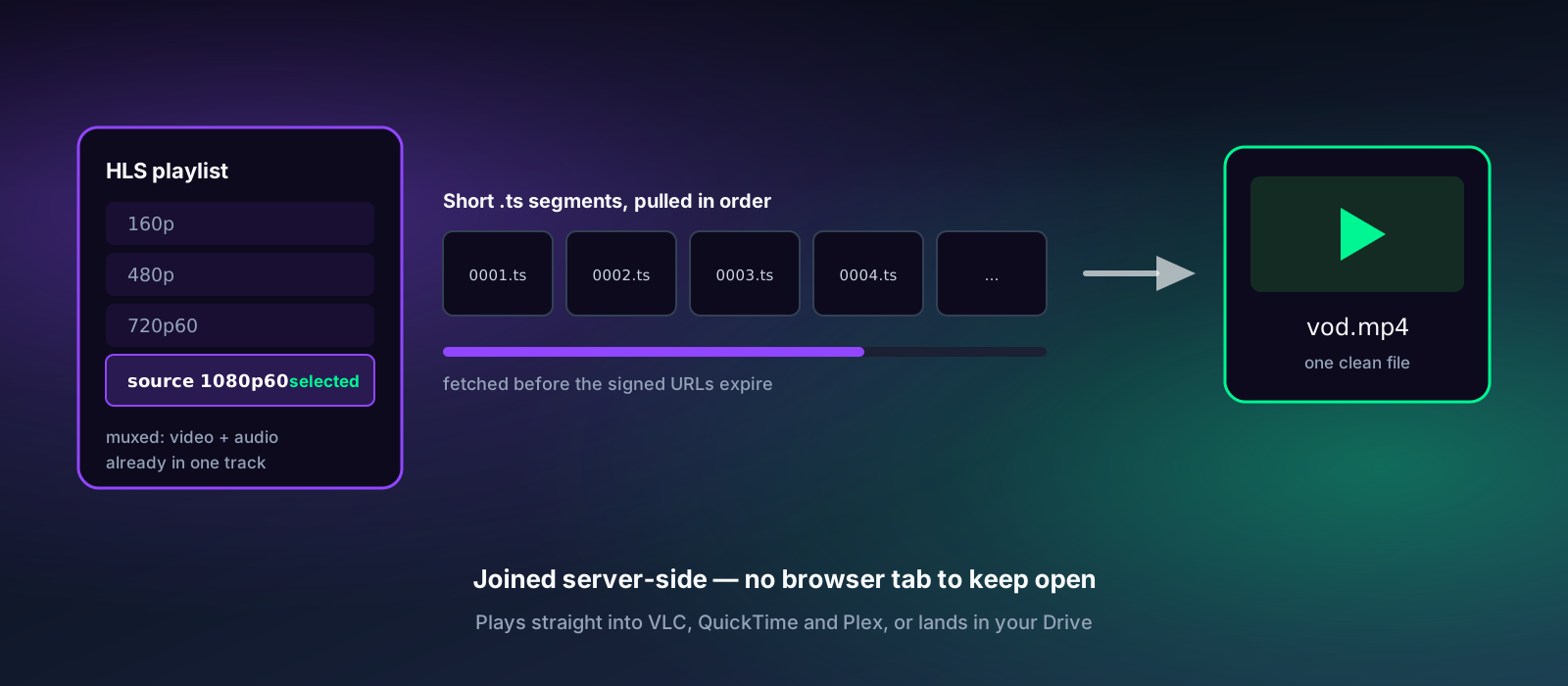
.ts segments. TubePull pulls them in order before their signing tokens expire and joins them server-side into one MP4.It's all built on yt-dlp, the same open-source extractor the serious archival community relies on. When Twitch changes its GraphQL schema or HLS layout — which happens every few months — yt-dlp ships a fix within days and TubePull picks it up on the next deploy. Desktop "leecher" apps that bundle their own extractor sit broken for weeks each time that happens, and hosted "record everything" services that store your video on their servers leave you stuck if the vendor shuts down or changes plans.
Who uses Stream Archiving vs. Pro's manual download
- Streamers backing up their own channel — turn on Stream Archiving once and never think about the 7-day timer again. Every future VOD lands in your Drive automatically, ready for re-uploads to YouTube, Shorts, and Reels, or just as an off-Twitch master copy.
- Editors and clippers — with archiving on, the full broadcast is already waiting in Drive to cut highlights and shorts from, without racing Twitch's clip tool and its 60-second ceiling. Use Clip Range on a Pro download to grab just the segment you need from your own VOD.
- Communities and moderators — Stream Archiving protects your own channel's charity streams and tournament finals automatically; Pro's manual download covers grabbing one of your own VODs before it expires if archiving wasn't on yet.
- Music and DJ streams — archive automatically to Drive, or manually pull a single set as MP3 with Pro, keeping the audio without a multi-gigabyte video file.
Why TubePull instead of a hosted "cloud archive" service or a desktop leecher
Most alternatives fall into camps with the same underlying trade-off. Hosted "stream archive" services record to their cloud, not yours — cancel or downgrade and your backup can go with it, and several cap free-tier retention at just a handful of days despite marketing "permanent" storage. Desktop apps that bundle their own extractor break for weeks every time Twitch changes its GraphQL schema. Ad-choked web tools wrap a stale copy of yt-dlp behind fake download buttons and popup redirects. Comparing sticker prices directly also isn't apples-to-apples: TubePull's $3.99/month archiving add-on requires the $4.99/month Pro plan underneath it, for a real $8.98/month total, not $3.99 on its own.
TubePull's Stream Archiving writes directly to your own Google Drive — there's no vendor lock-in, no proprietary storage to lose access to, and no ambiguity about who owns the files. Pro's manual download runs the current yt-dlp on maintained hosted infrastructure, server-side, with no install and no extension. Clips are free, Clip Range pulls a segment from anywhere in a full-length VOD (not just short clips) on a Pro download, and meme GIF export is built in — features most Twitch-focused tools don't offer at all. For a full breakdown of how own-cloud archiving compares to hosted competitors like StreamRecorder.io and Stream Archive — plus exactly how Twitch's retention timers work and how much storage a VOD actually needs — see Twitch VOD Storage Explained: Own-Cloud vs. Hosted Archiving Compared.
What does not work
- Pasting the URL of a stream that's live right now — manual Pro downloads work on finished VODs and clips, so for a broadcast still in progress you'll need to wait for the VOD. Stream Archiving is the live path: it records your own connected channel in real time from the moment you go live, but it runs on that channel automatically rather than on a URL you paste.
- The stretch of a broadcast before archiving saw it start — recording begins when your channel's stream-online event reaches us. If that event is missed, we fall back to fetching the VOD once Twitch publishes it, which depends on your channel having VOD storage turned on.
- Broadcasts past the 12-hour mark — each archive captures up to 12 hours, so a marathon or subathon stream is archived up to that point rather than end to end. Manual Pro downloads have no length limit if you need the rest.
- Subscriber-only VODs and clips — these need a paid channel sub and are gated at Twitch's edge; TubePull can't reach them either way.
- Already-expired VODs — once Twitch's 7-day (or 14-day) timer purges the file, nothing recovers it, archived or not. That's exactly why Stream Archiving exists — to grab it before then, automatically.
- Banned or deleted channels — Twitch removes the VOD/clip files within hours, so archive promptly; already-archived copies in your Drive are unaffected.
- DMCA'd clips after Twitch processes the takedown — paste while it's still publicly viewable.
- Twitch chat replay and emotes — TubePull downloads the video and audio, not the chat log or emote data. There is no chat export.
More guides
- Twitch VOD Storage Explained: Own-Cloud vs. Hosted Archiving Compared — retention rules, storage math, and how TubePull's Google Drive archiving compares to hosted competitors
- How TubePull Twitch Archiving Actually Works: Recorded Live, Not After the Fact — the EventSub-to-Drive pipeline behind real-time capture, explained
- Never Miss a Stream: Twitch Archival Is Now on TubePull — the Stream Archiving feature launch and pricing
- Archive Twitch clips and VODs before the timer runs out — how Twitch's expiry windows work and how its video is served
- Twitch Clips vs VODs: What Expires, What Doesn't — the retention rules, tier by tier
- Download Vimeo 1080p — creator backup workflow — for streamers who cross-post to Vimeo
- Video-to-meme GIF maker — caption styling, length limits, and watermark rules for GIF exports